What a summer! One of the huge benefits of being a teacher is the 13 weeks of holidays that we get every single year. They are well-earned after a year of incredibly hard work, but having such a long period of time to yourself makes it all so worth it.
What’s even more worth it is the 6 weeks of uninterrupted time off.
Don’t get me wrong, it’s no picnic; there are times when I’ll have to get ready for the incoming term. I’ve already explained how to have a productive summer as a teacher so, if you’re feeling underprepared, you might want to read that post first. Come back here when you feel like you’ve finished all of the planning that you need to hit the ground running with the new term.
I always make sure that my planning doesn’t take too long, though, since summer is all about two things: relaxing and adventuring. Once I’d finished my to-do list, I quickly got down to business with the very hard task of relaxing, exploring, and taking it easy. My first stop was a holiday to Majorca, but then I spent 3 weeks on a once-in-a-lifetime trip to Japan.
More on that later. Right now, we need to get ready for the incoming term. You’ve had a rest, you’ve done the planning that needs doing, and now you’re ready to get back to what you do best: teaching. Not so long ago, I broke down my Everyday Carry of Teaching Essentials. How has this changed in the past 3 years?
Here’s my shopping list for all of the essentials needed for your teacher toolkit.
*Any items marked with an asterisk are affiliate links and will generate a small kickback for me at no extra cost to you. Buying anything through these links helps to support the blog and keep it free.

A bag for all of your things
I have two bags that I use. For the lighter, everyday use, I use this one.* I think it’s stylish, trendy, and comes with just enough pockets that I can keep my iPad separate from my lunch, stationery, and the all-important Bullet Journal, which I’d be pretty hopeless without.
On the inside is a pouch for a small laptop or average-sized tablet. I never run out of room when using this bag, since any marking tends to stay at school, so it’s not like I’d need to lug it across town on my back. On the days that I do take anything home with me, books will live in a bag for life and go straight into the boot of my car.

On my heavier workload days, I need to opt for a much bigger bag. For a long time, I used this bag*, but when that finally gave up and Amazon decided to stop stocking it, I opted for a little more colour.* Sadly, the exact one that I bought is now unavailable, but the one that I’ve linked is just as good, except this time in all black. This bag is my go-to for going on holiday, and it saved my life while travelling this summer, but it’s also good for those days when I am actually going on a hike.
In reality, I don’t use this that much for my everyday carry, but it’s indispensable when leading a trip, and not wanting to have to carry the medical supplies separate from my other bits and pieces. I was first attracted to this bag because of its plethora of pockets (big enough for a 15-inch laptop – and then some), but I stayed for the hip straps. If the bag is full, then distributing the weight onto other parts of my body is absolutely necessary.

Where to write your notes
I have two main places that I write in throughout the day: my teacher planner and Bullet Journal.
This Teacher Planner contains everything you could possibly need in a teaching environment.* Room to plan lessons, for tracking data and for updating a yearly calendar – though I’ve since drifted from this one aspect after embracing the magic of Google Calendar.
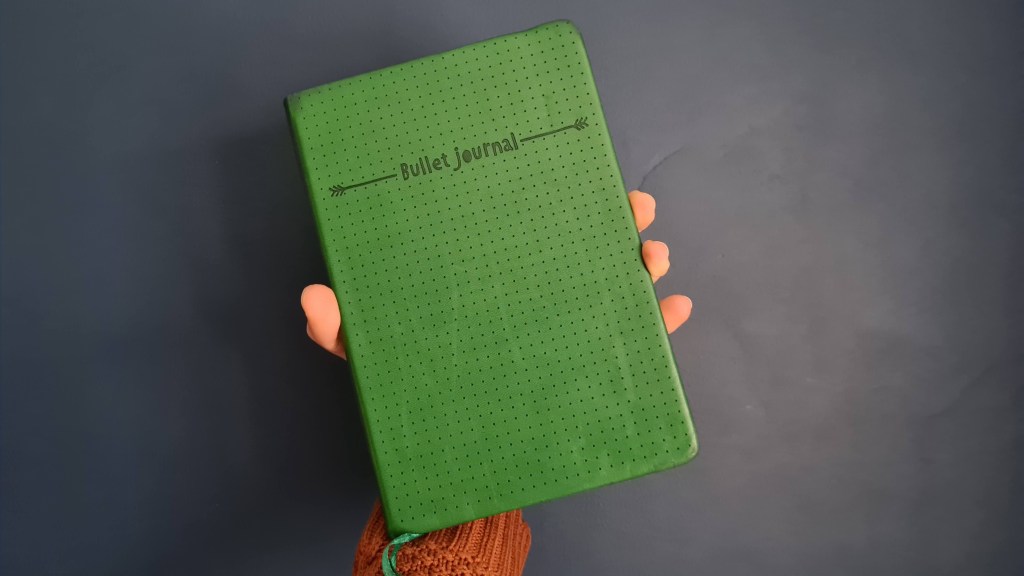
My Bullet Journal is an extension of my body. It goes with me everywhere, and it tracks my tasks, what I’ve been up to each day, my habits and even the exercise that I undertake. I’ve blogged all about it on this post, which has everything you could need and more about how to setup a simple, yet effective, Bullet Journal like mine. The one that I get is from a shop in the UK called Tiger – I think it’s about £3 – but here’s a direct link to one that’s very similar.*
Techno Teacher
As a school, we have a very clear iPad policy. Every single student gets an iPad when they join, and every single teacher gets an iPad to use, too. We’re expected to use these as part of our teacher toolkits, rather than as replacements to our current teaching tools. For instance, check everyone’s learning all at the same time using Whiteboard.FI, or have them produce a podcast to record their learning about the death of Archduke Franz Ferdinand (which we used to do as a newspaper report, but this would achieve the same outcome anyway. Using a podcast, rather than a newspaper all the time, is a simple way to change things up to make learning a little more fun).
Your school might be the same, which is great – but it might not be. I’d strongly recommend an iPad to supplement your pedagogy. They’re great for presenting to a whiteboard that’s setup with Apple TV or a suitable casting device, since you can teach from the back of the room, behaviour manage more effectively, and advance your PowerPoint – all at the same time. But the better benefit is from its suitability as a second screen. I won’t have to worry if all of the staff room computers are being used up, since all I need to work at is a spare desk.
I’d recommend the iPad Air 6, from 2024, since that’s the device that I’m currently using in my spare time.* It’s powerful and gets the job done. Combine that with a Logitech Combo Touch keyboard case and you’ll be set,* as it comes equipped with a detachable keyboard, allowing you to sidestep into tablet-only mode. My school gives each of us an iPad 7th generation. They work fine, but you can tell that they’re definitely dated.
Here are my essential iPad reviews and posts:
Conversely, if you don’t fancy supporting Apple, or your budget won’t stretch, any cheaper Android device that supports word processing and the occasional distance-based meeting will do just fine. We stick with Apple because of its great Education perks, which I got a lot more training with when I completed the Apple Learning Coach programme.
If you fancy an Android to use while teaching, I’d recommend this one.*
What to write with
I won’t lie, I’m not a massive stationery guy. If you’re looking for pretty reels of Bullet Journal decorating, you’ve come to the wrong page.
However, I do have some favourites. The Muji pens, in particular, are great because of how smoothly they write. Here are my essentials for you:
Pastel-coloured highlighters.* I love pastel colours.
BIC 4-way pen.* Nothing trumps the versatility of these guys.
A set of Muji pens.* I love having at least one of orange, purple, red, light green, light blue and black; any others are bonuses. I prefer to use 0.5-type nibs, but the 0.38s work great, too.
A pencil case. I’m actually using one that I had while I was in secondary school but, if I were to get a new one, I’d choose one with multiple pockets and a sturdy zip, like this one.*
A 15cm ruler, since that’s all you’ll be able to fit in your pencil case and you might need it anywhere. Mine is still working from my days at school, but this is the one that I’ll replace it with when it eventually bites the dust.*
A calculator.* It’s always useful to have one to hand so you don’t need to have your phone out for the calculator app, as I find that I can get easily distracted if I’m not using any strategies to keep me focused and off social media. Just remember to buy a non-scientific one with big buttons to make the whole data-entry process as streamlined as possible.
Post-it notes.* You will always need post-it notes.
A range of folders.* I use one to keep my lesson resources in for the week, one for KS3 lessons whose resources I want to reuse next year (those A3 sheets are expensive to print for carousels), and one each for my KS4 and KS5 units. That’s a lot of folders, so make them colourful and easy to spot so you know at a glance which is which. Fill them with plastic wallets* and dividers* and you’ll be good to go.
What essentials are you going to stock up on before the new term starts? Let me know in the comments below – and don’t forget to follow the blog while you’re here.
If you liked that, you might also like…
- Reclaim your evenings: A Busy Teacher’s Guide to Healthy Meal prep
- 16 incredible books to read in 2026
- How to actually achieve your goals in 2026: The Anti-Resolution toolkit
- The First 90 Days: How to survive (and thrive) as a new Head of History
- 7 Brutal Questions to Course-Correct your Life before 2026
Keep up to date with my socials:
 Hardly Hamilton