There are many, many reasons to buy an iPad. You might already own an iPhone and want a bigger screen without shelling out for a MacBook. You might not mind the price tag but enjoy the portability that only a tablet can provide. You might be well and truly absorbed into the Apple ecosystem and need a second screen to sidecar next to your MacBook Pro.
For me? I’ve owned iPads for over ten years now. My love affair started with the iPad Mini 2. After four years, I upgraded to the iPad 6, released in 2018, to celebrate the completion of my University degree. Ever since the Magic Keyboard released in 2020, I’ve wanted to upgrade. My laptop is approaching ten years old and I’ve not had reason to use it since building my desktop PC over the Covid lockdowns. Equally, any teaching work that I need to do while on the road gets handled by my Samsung S20, once I’ve plugged it into a monitor to activate Dex mode.
Sadly, I’d noticed that my iPad 6 was starting to show its age. Its battery was less efficient, apps felt sluggish, and typing on a Google Doc that wasn’t even 1,000 words long would suffer from a little input lag. It wasn’t unusable but, as someone who likes to write a lot of his blog content on a train or away from his desk, it wasn’t proving to be the best experience.
Then Apple held its big press conference. It was May 7th and I was very excited to see if they were finally going to make it worth my while to upgrade. My iPad still got the job done when connected to a bluetooth keyboard,* but I really was just looking for a reason to pull the trigger on a new device.
And boy, did they give me a reason. After a lot of umming and arring, I decided to invest towards the end of May, and at the time of writing, I’ve been using my device for about a week or so. But how did I know that now was the time to upgrade? Why hadn’t I upgraded in 2021, and why wasn’t I prepared to wait for another year?
Read on to find out why I decided that now was the right time to upgrade, and why I went for the 13” Air over any other model.

The camera
I love staying in touch with friends, and it’s way more fun and engaging to do so by video, rather than by direct message. However, what is not fun is laying my iPad down horizontally and having to look off to the left hand side, since Apple stubbornly decided to keep the front-facing camera there since its inception.
I had resisted buying a new device for this long specifically because of Apple’s refusal to move the camera to a more sensible location. What a wave of relief I felt when the camera was finally shown along the top right hand side of the device, right in the middle, meaning that looking at the person I’m speaking to on my screen will actually show my eyes pointing at the camera too.
The camera’s positioning was obviously not the only reason I upgraded; a sweet bonus was the visual upgrade. My iPad 6 sported an 8 megapixel back camera and a 1.2 megapixel front-facing camera.
When I saw the figures for the front camera, I had to take a double-take. The iPad Air 6 now has two 12 megapixel cameras – one on the front and one on the back. The quality jump is insane.
Now, I never took many photos with my iPad’s rear camera – and still don’t plan to, but the front-facing camera is pretty much ten times as good as my previous model. FaceTime has never looked so good.
The processor
I don’t claim to be some tech guru who knows all about the differences in Apple’s lineup of the various chips that it uses in each of its devices. What I do know is that Apple has two types of chips at the moment: the A-series and the M-series. The more powerful, newest, ones are found in its M-series – and the higher the number, the better for the consumer. If you want a more in-depth description than that, I’d recommend this video by MKBHD:
My iPad 6 has the A10 chip inside of it. For comparison, the iPad 10th Generation (Apple’s budget version) has the A14 chip inside of it. The latest and greatest iPad Pro (Apple’s absolute best tablet) has an M4 chip. Objectively, I knew that this meant that my device was quite old and that its slow performance was to be expected.
It wasn’t until watching videos by various YouTubers, such as Byte Review, testing and comparing the latest and second-most-recent iPads, that I realised how much faster my tablet could be.
An upgrade had to be made.
The storage & the screen
My iPad came with a whopping 32gb of storage. Wow, I thought at the time. This is huge!
Actually, I would eventually learn, it wasn’t. The more that I used the tablet, the more that I’d want to download onto it. This was especially important when it came to travelling, since the amount of shows I could download to Netflix or Crunchyroll started to become more and more limited.
This year, I figured that, if I’m spending a lot of money on an iPad, I may as well future-proof it. Instead of simply getting the smallest storage size – 128gb – to save money, I would opt for the next size and spend a little extra for 256gb.
Equally, future-proofing impacted my screen size choice. I use my iPad every day, either for blogging or for consuming content. That’s why I went for a 13 inch screen, which is a simply phenomenal size increase over the 9.7 inch screen of the iPad 6. If you can afford the larger size and don’t already have a portable daily driver, I could not recommend the huge screen enough. It’s great, especially for multitasking. Plus, I didn’t truly appreciate the quality of the screen until capturing thumbnail images for this post. The new Air’s screen looks beautiful compared to my older model.
I’m planning on keeping this device in my arsenal for the next seven years or so, which will make it my longest-lasting device so far. Ensuring that it’d be ready to use for everything that I could ever dream of doing on it was therefore a really important consideration.
The keyboard
When I first used my iPad Mini, I stuck with the on-screen virtual keyboard. This was fine, since I mainly used it for scrolling and watching Netflix. Then, in my third year of University, I was gifted the Microsoft Foldable Keyboard for Christmas.
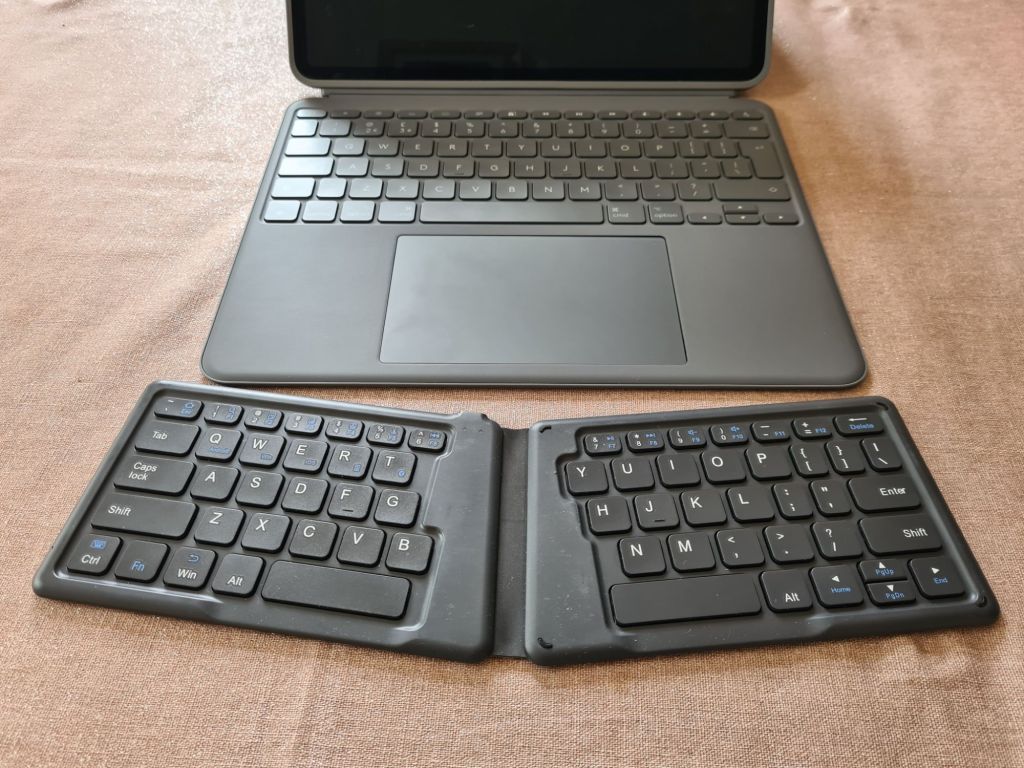
What a device! Sadly, this died on me late last year after six years of service, and Microsoft have bizarrely discontinued this superb piece of technology, which forced me to scrawl the internet for another. I did find another, which was still foldable and actually built to be more ergonomic in the way that it was designed. It was wildly affordable and comfortable to use. You can pick yours up from this link if you’re tired of the virtual keyboard but don’t want to spend a fortune.*
With all that being said, when I saw the students at my school open their Logitech keyboard cases for their 9th Gen iPads, I couldn’t help but feel a pang of jealousy. For someone who no longer really uses their laptop, having a keyboard case for my iPad felt essential. I was never interested in the Magic Keyboard, Apple’s answer to turning the iPad into a proper laptop, since it doesn’t let you detach the keyboard at all.
Logitech, however, offer a solution, giving its users a case for the device that has a detachable keyboard.
Detachable!! It could be a laptop or a tablet, depending on your use-case. This was absolutely perfect for someone who uses his device for both use-cases (no pun intended).
I couldn’t say no. Pick yours up here.*
Expendable income
I’ll be honest: I would never have dreamed of the upgrade if I didn’t have an expendable income. I don’t have any dependents, but I do have a full-time job, meaning that my money is my own. Without an expendable income, I’d have happily stuck to my iPad 6. It was still working, it was just a bit slow.
And the size of its bezels were starting to get a little annoying.
If you’d like to earn a little extra money to supplement your own, read all about how I’ve earned hundreds of pounds online using Prolific, an academic survey site that tells you exactly how much you’ll earn for every survey you answer.
That sounds like a scam, but this genuinely helped get me closer to my iPad savings goals quicker than I would have otherwise.
Are you upgrading to the latest and greatest devices? Or are you loyal to tablets for Windows or Android? Let me know in the comments below.
If you liked that, you’ll love…
- Reclaim your evenings: A Busy Teacher’s Guide to Healthy Meal prep
- 16 incredible books to read in 2026
- How to actually achieve your goals in 2026: The Anti-Resolution toolkit
- The First 90 Days: How to survive (and thrive) as a new Head of History
- 7 Brutal Questions to Course-Correct your Life before 2026
Why not stay up to date with my social media?
 Hardly Hamilton
8 thoughts on “iPad Air 6 review: How to know when it’s time to upgrade”