When it comes to cloud storage and productivity tools, Google Drive and Microsoft 365 are the two major players competing for your attention. Both offer a full suite of apps for documents, spreadsheets, and presentations, but their features and usability vary depending on whether you’re working on an iPad, desktop, or mobile device.
So which one is better? That depends on how you work, the devices you use, and whether you prefer Google’s seamless collaboration or Microsoft’s robust formatting and offline capabilities. I’ve had extensive experience with both services, so I’m going to compare Google Drive and Microsoft 365 across iPadOS, desktop and mobile to help you decide which is the better fit for your workflow. Is Google Drive better than Microsoft 365? Let’s dive in.

Google Drive vs. Microsoft 365: Key Differences
Before diving into platform-specific comparisons, let’s break down the core differences between Google’s Workspace (which includes Drive, Docs, Sheets, and Slides) and Microsoft 365 (OneDrive, Word, Excel, and PowerPoint).

At first glance, the winner appears to be Google Drive – but its features are only half of the story. Let’s take a look at how the services compare across different devices.
Google Drive vs. Microsoft 365 on iPadOS
Google Drive on iPadOS
The Google Drive app makes it easy to access files and integrates tightly with Docs, Sheets, and Slides. Google’s iPad apps support real-time collaboration, but they lack some desktop features, such as advanced formatting and add-ons.
Using Google Drive in a browser like Safari or Chrome gives access to more features, but the experience isn’t fully optimised for touch. However, Google Drive integrates with the Files app, making it easier to manage files across different cloud services. I can easily open Files and navigate and move files much easier than I can in the Drive app – which is weird, but works for me
Microsoft 365 on iPadOS
Microsoft’s Office apps—Word, Excel, and PowerPoint—are fully functional and optimised for iPad, especially when paired with an Apple Pencil or Magic Keyboard. Files are stored in OneDrive by default, but users can also save them locally or in the Files app.
Unlike Google’s iPad apps, Microsoft’s apps support tracking changes, comments, and advanced formatting, making them more powerful for document editing. The desktop-like experience of Microsoft 365 makes it a better choice for complex documents and spreadsheets, though the browser version leaves a lot to be desired.
Verdict
For quick edits and collaboration, Google Drive is the better option. However, for serious document editing, Microsoft Office provides a more powerful experience on iPad.
Google Drive vs. Microsoft 365 on Desktop
Google Drive on Desktop
Google Drive is best accessed through Chrome, where all features are available. The Google Drive desktop app allows file syncing for offline access, but I rarely use it there. Docs, Sheets, and Slides are lighter and faster than their Microsoft counterparts but lack deep customisation options.
As a cloud-native ecosystem, Google Drive doesn’t require any software installation, making it an easy solution for users who prefer working entirely online or have limited storage – like if you’re working on a Chromebook.
Microsoft 365 on Desktop
The full desktop versions of Word, Excel, and PowerPoint provide the best experience for power users. Microsoft 365 works offline by default, syncing files when an internet connection is available. It’s better suited for users who need macros, advanced formatting, or enterprise-level features.
With Teams integration, Microsoft 365 is often the better choice in the corporate world.
Verdict
Google Drive is great for lightweight, cloud-first work, while Office 365 is the better option for those who need powerful, fully featured desktop applications.
Google Drive vs. Microsoft 365 on Mobile
Google Drive on Mobile
The Google Drive app is fast, intuitive, and easy to navigate. Docs, Sheets, and Slides allow basic edits but lack advanced formatting options. Collaboration is seamless, making it ideal for real-time work on the go. However, it works best with an active internet connection.
Microsoft 365 on Mobile
The Office app combines Word, Excel, and PowerPoint into a single mobile application. It offers better offline support than Google’s mobile apps, but some features, like macros and advanced charts, are limited compared to the desktop versions.
OneDrive integration makes file access easy, but the app can feel heavier than Google Drive.
Verdict
For quick access and simple editing, Google Drive is the better choice. However, for more robust document editing on mobile, Office 365 is the stronger option. If it were me, I’d stick to Drive since I like to keep my work-on-the-go as light and easy-to-access as possible.
How much do they cost?
Both services offer free plans, but for professional use, a paid plan is almost always necessary. I’m personally on 50gb in my Drive plan, since that also accommodates for Cloud Photos storage.
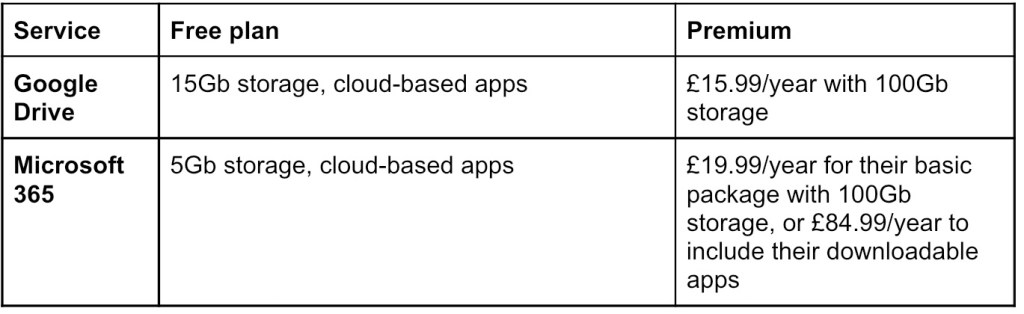
The price comparison winner really does depend on whether you want the Office apps for your computer. Equally, you can choose to buy just the apps package for a one-time purchase of £119.99. If you don’t like subscriptions and plan on only using one device, this might be more up your street.
Which one is right for you?
Only you can make that call. Both have their strengths and weaknesses depending on where you work, with Drive being the better choice if your priorities involve real-time collaboration, mostly online work, and rely on Google’s ecosystem. Microsoft 365, on the other hand, is ideal if you’re after full-featured desktop applications, work with complex files, or use Teams and Outlook to collaborate.
On iPad, Microsoft 365 is probably better for deep work and productivity, while Drive remains more flexible. As for desktop, Microsoft 365 dominates, but on mobile, Drive is the easier suite to use, despite Microsoft 365’s more advanced features.
Ultimately, it will come down to how you work best, whether that’s on desktop, tablet or mobile. Regardless of the option you go for, it’s best to stick with one or the other. You can save Office Docs in Drive, for instance, but its features and usability then pale in comparison to the better-integrated Docs. Plus, nobody really wants two subscription plans, so why invest in more than you need to?
Remember, as well, that none of this has considered either service’s AI services, Gemini and Co-Pilot. I’ve not tried out Microsoft’s companion, but you can read my review of how I used my Samsung S25 Ultra as an AI tour guide of Florence to see Gemini in action.
Personally, I used to use Microsoft 365 every day when I was at Uni, since the University of Birmingham offered it for free. Now, though, I use Drive on a daily basis, since I like to bounce between devices and prefer flexibility to deep customisation. Which one do you prefer? Let me know in the comments below.
If you liked that, you’ll love…
- Reclaim your evenings: A Busy Teacher’s Guide to Healthy Meal prep
- 16 incredible books to read in 2026
- How to actually achieve your goals in 2026: The Anti-Resolution toolkit
- The First 90 Days: How to survive (and thrive) as a new Head of History
- 7 Brutal Questions to Course-Correct your Life before 2026
While you’re here, check out my socials:
 Hardly Hamilton
One thought on “Google Drive vs. Microsoft 365: Which is Better for Productivity?”