Picking a new iPad is hard. You’ve already made the decision to pick an iPad over an Android – and I don’t blame you. It’s not because they;re bad; quite the opposite.
I am a huge supporter of all things Android; recently, I bought Samsung’s Smart Tags so that I can track my luggage and keys using my Galaxy S20. That phone pairs very nicely with the Galaxy Watch that I reviewed not so long ago, and keeping my toes dipped in the Samsung ecosystem means that I can take advantage of Dex, Samsung’s software that converts your phone into a desktop experience for the big screen.
And yet, I’m writing this blog post on an iPad. Why?
Well, I’ve been using iPads for years by this point. My first one – I think in 2013 – was an iPad Mini. For what it was, it worked remarkably well. In my downtime, it was a Youtube and Netflix machine. While at Uni, I used it as a second screen alongside my now very dated HP Laptop. After five years, I upgraded to an iPad 6. Apple’s since moved up to the iPad 10 as their base model, yet the Mini and Pro models still coexist, alongside the Air, which I move up to this year. Part of the reason that I stuck with Apple, specifically for tablets, is because I’m used to it.
I like that I get to use multiple different operating systems to work, depending on what I need most at any given time. I’m not sure that I’d enjoy sacrificing Dex by giving up my Samsung device, just so that I could seamlessly access the same messages and photos on an iPhone and an iPad – tempting as it may be.
On top of that, the interface, the design, the layout – and now the increased customisability, which Apple has leaned more and more towards over the years – have kept me hooked. It’s so simple and so clean. The bits and pieces that make this whole thing run inside of my 13-inch screen all keep it in tip-top condition, too. It’s very rare that I’d ever be worried that my iPad Air isn’t going to be able to do what I’m asking of it, or that it would crash while I’m trying to load something.
Are there things that I would improve about an iPad? Yeah, absolutely. I’d install a kickstand when it’s being manufactured, for one. I’d create more custom-built apps, so that I can run Instagram in a way that takes advantage of its large screen, rather than having to rely on a scaled-up version of the iPhone app. I’d also put magnetic grips into more non-Apple pens, so that my Logitech Crayon would stick to the top without any extra ad hoc systems.
But that’s all by-the-by. The fact of the matter is that I love using iPads. I could have invested in a huge Samsung tablet – and I nearly did – but I kept on coming back to the iPad. The hard part came when I needed to decide which one to go for. I kept wondering whether I should opt for the iPad Pro, to future-proof the device, or if a simpler model would be enough.
For my use cases, the iPad Air is absolutely enough. It could be different for you, so have a read of my comparison of the different models, with recommendations of what you should pick to suit your use cases. If you’ve got a particular device in mind, scroll down and start there first; I’ve ordered this list by price, with the cheapest at the top. However, I’m all about getting to the point: there’s a reason that I went for the Air so, in most cases, I think that’s the device that I’d recommend to most people. In any case, I think I’d always recommend choosing a storage size that’s at least 128gb. My old device was 32gb, and I filled this up quickly.
Anything marked with an asterisk* are affiliate links. Using them to order your devices may produce a small kickback for me to help keep the blog free.

iPad 10
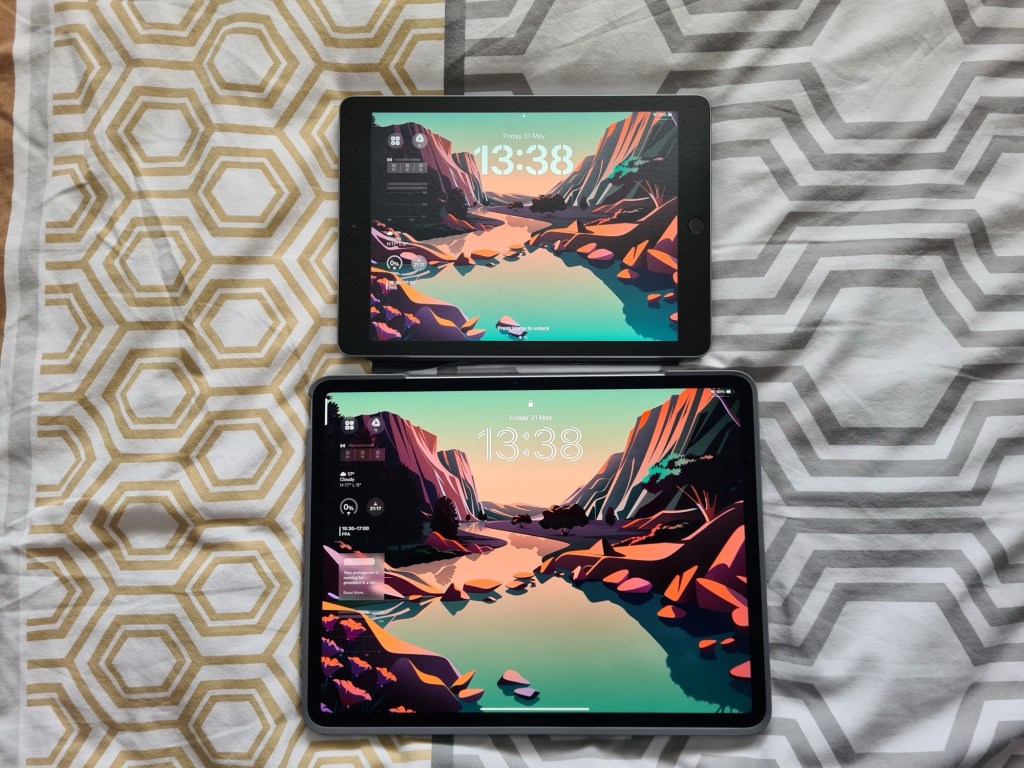
This is the cheapest model of iPad out there. It’s also the most basic, but that doesn’t mean that you should ignore it. All of Apple’s tablets now come with edge-to-edge screens, which was one of the main things that I wanted. My old iPad 6, which you can see pictured in my review of the Air 6, had a combination of the classic Home button and huge bezels.
By this point in my life, I was ready for something a little more high-tech. The iPad 10 met my requirements here, and it’s perfect if all you plan on doing with your device is a bit of scrolling, Youtube-watching, and some simple word processing. I’ve also recently upgraded to the iPad 10 for educating my students, and you can read about my in-depth review now. Get yours here.*
Perfect for: Students at school, college or University, for leisure or for those who want to work away from their main device. You can get away with only having this as your daily driver, but might get frustrated when you try to do multitasking.
iPad Mini 6
This one recently got its long-awaited upgrade, and it’s more of the same that came before – which is good, but the internet seemed to be expecting a little bit more.
What I mean by that is the iPad Mini 6 will do just fine for what you’ll need it for. One of the original models was my first iPad, and I loved it at the time; it was absolutely perfect for my use-cases. It’s a great size for fitting into the palm of your hand; think of it as a big iPhone: the hole-punch front camera is still even on the top of the display when held in portrait mode (all of the other choices have landscape front cameras).
This camera placement is perfect for its use case, though, since you’ll probably want to hold it in one hand while drawing on it, or FaceTiming, with the other. Click here for my affiliate link to an iPad Mini 7.*
Perfect for: Younger kids if you’re interested in starting them on their first iPads, students who want an e-reader or second screen. I wouldn’t recommend this as your main device for word processing due to the screen’s size. You certainly won’t get on very well with multitasking if you do.
iPad Air 6
Ah, my personal favourite. The iPad Air 6 comes in two sizes, and you really need to think about which size you’ll get the most use out of. If it’s replacing a laptop, which mine did, I’d go for the 13-inch. If it’s a second screen or a secondary device, opt for the 11-inch, since it’s slightly more portable.
But why should you get an Air over a 10? For me, it was about future-proofing. I want this device to last for years, which is why I also chose the 256gb version. I don’t want to have this for a couple of years, and then complain about it starting to slow down, which is what happened to my previous device. It’s a lot more money than the 10 or the Mini, but in my opinion, worth it. Pick yours up from this link.*
For the full review, click here.
I’ve also reviewed the Logitech Combo Touch case with detachable keyboard, which I also think is an essential piece of kit for the Air. You can get yours from this link.*
Perfect for: Young professionals, bloggers, writers, people looking to replace their (old) laptops, students completing lengthier pieces of work, like an MA or PhD.
iPad Pro 7
Phew, we’ve made it to the really expensive one. Each of the iPads on this list contains a different chip inside of it, which impacts how efficiently it runs, among many other things. The Air’s chip is the M2 chip, whereas the Pro’s is the M4. I’d highly recommend watching an in-depth Youtube video about the difference between these chips, but all you really need to know is that, as fast and powerful as the M2 chip is, the M4 is twice as good.
The iPad Pro is immense. I’ve only ever used it in Apple stores and in Costco, and you can feel the difference, especially when compared to the 10. I can only speak for myself here, but I can’t see myself ever getting the full use out of the Pro. There was a time, before the most recent models released, when I considered buying one because of its 13-inch size, but when the Air 6 was announced with two different screen sizes, my mind was made up. There are very few people that I’d actually recommend the Pro for. However:
Perfect for: Artists, video makers or anyone else with a heavy workflow. If this isn’t you, and you don’t consider yourself to be one of the ‘pros’ who needs the very highest of the range, state-of-the-art iPad, save your cash and get the cheaper model. If you are a pro, get yours here.*
I’m still undecided
Spending money on an iPad is a big commitment because, whichever you opt for, it’s going to cost a lot of money; that’s unavoidable. However, I’ve got two ways to think about this more objectively, by asking a simple question:
Do I already own an iPad?
- No. Therefore, getting even the least expensive, full-sized, iPad will help me with my workflow or leisure time. I will get the iPad 10 because finally having a second screen to use at work or to watch Netflix on will be so much easier than booting up my ten year old laptop.
- Yes. Therefore, I should consider waiting until enough improvements have been made to the device that I’ve got my eyes on and purchase whichever one most effectively fulfils my needs, according to the above list. Any improvement when compared to my current device will be really beneficial, but spending more than I can afford won’t actually help me that much.
What I’m trying to get at is that if you don’t own an iPad, the improvements to your workflow could be dramatic. Compare that to upgrading your device, and you’re not going to see that much of a difference – unless your current model is one of Apple’s earlier tablets.
Which device do you use? Are you fully in the Apple ecosystem or do you like to mix between iPadOS, Android and Windows, like me? Let me know which device you’re going for in the comments below.
If you liked that, you’ll love…
- Reclaim your evenings: A Busy Teacher’s Guide to Healthy Meal prep
- 16 incredible books to read in 2026
- How to actually achieve your goals in 2026: The Anti-Resolution toolkit
- The First 90 Days: How to survive (and thrive) as a new Head of History
- 7 Brutal Questions to Course-Correct your Life before 2026
Why not follow my socials while you’re here?
 Hardly Hamilton
2 thoughts on “Why is choosing the right iPad so hard?”