Let’s paint a picture: you’ve already spent hours comparing different tablets, and settled on an iPad.
You then spent another 6 minutes reading my in-depth review of the iPad Air 6. After all of that research, you made up your mind on the kind of device that you want to spend your hard-earned money on.
What now?
It’s arrived in the mail, or you’ve picked it up from your local Apple Store, and you’ve got to work. There are so many fun features to explore with these devices and so many ways to customise them to make it really feel like yours. As one small example, I watched a video by Byte Review on Youtube to discover how to use shortcuts to enable specific screens at various times based on what I’m doing – gaming, working, or my daily habits. But accomplishing any of that is going to be pretty difficult without my trusty keyboard in tow.
Picking a keyboard is easier said than done. Get ready for another rabbit hole of research which might, at times, feel pretty overwhelming. If you need help with picking the perfect keyboard, you’ve come to the right place. I’m going to detail who exactly needs a keyboard for their tablet, the criteria you should consider when comparing different models, and my own recommendations towards the end.
*Anything marked with asterisks are affiliate links and, if you choose to use them, will help to support the blog at no cost to you. Thanks for your support!

Who needs a keyboard?
This question can only be answered by considering your use-cases. What did you buy an iPad for – to stream movies, or to do some word processing? Are you an artist? If so, you might want to stick to the Apple Pencil. On a budget? If so, check out my review of two very competent competitors here.
If you know that you want to use your iPad as a blogging machine, or a device to answer emails and do some writing, however involved that may be, you will need a keyboard. The virtual, on-screen keyboard is fine; it gets the job done, but it’s nothing special. If you stick with the on-screen keyboard, you won’t be able to type for very long, or very fast – which I practically live for. Plus, it’ll only slow you down; you won’t be able to type really fast, which is one of the things that I enjoy the most about having a physical keyboard.
With that in mind, here are my three criteria for helping you to choose a new keyboard.
- Budget
This is perhaps the most important factor that you’ll need to consider before buying a new keyboard. How much are you willing to spend? You would have just spent a small fortune if you’ve recently bought a new iPad, so your bank might not be looking as healthy as you would like it to. Perhaps, then, a cheaper bluetooth keyboard is more up your street. Or, if you’ve got some savings, why not spring for the pricier models?
On a budget? Stick to around £30
Got savings? The most expensive models come in at over £300, but you needn’t spend that much. There are some great keyboards available between £100-£200.
- Stickiness
What purpose is your keyboard going to serve? If you don’t want it attached to your iPad, or you want to use it with multiple devices, opt for a bluetooth keyboard. If you want the keyboard to stay stuck to your device, it’s time to buy a clamshell keyboard case. Then, you’ll need to consider whether you want the keyboard to remain permanently attached to your case, or if you want one that’ll come off and give you the option of tablet-only.
The latter will, of course, cost you more.
- Portability
Part of the keyboard’s portability will be determined by how big your iPad is. If you’ve gone for a 13-inch model, like me, then any keyboard cases are going to be the same size – big. However, if you’ve chosen the smaller iPad 10, or iPad Mini, your keyboard cases will be smaller too.
Likewise, detached bluetooth keyboards come in a variety of sizes. I personally wouldn’t recommend a full-sized keyboard, since transporting it will be a nightmare. Instead, look for foldable keyboards that you can throw into your bag. Not only are they more portable, but foldable keyboards also protect their own keys by nature of their designs.
Picking the perfect keyboard
Now that you’ve assessed your needs, we’re onto the fun part: recommendations. I’ll order these from lowest to highest in terms of budget.
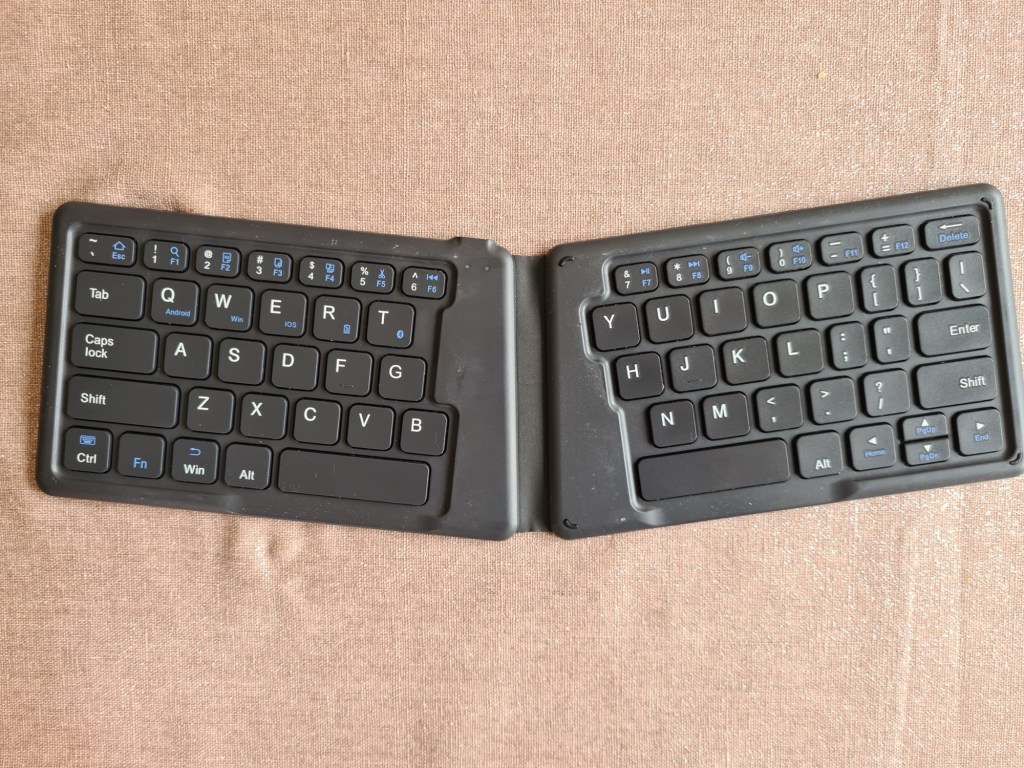
MoKo Universal Foldable Keyboard*: This one is about £30. It’s foldable, so will fit into your bag, and easily pairs via bluetooth. This means that you can quickly pair it with different devices. It’s also ergonomic, since it’s angled to best align with the natural placement of your hands. Despite being the smallest keyboard on this list, the individual keys are actually still quite large – so you won’t feel cramped while using it. It also fits nicely onto a train or plane table, meaning that you can continue to be productive while on the go.
Logitech Rugged Folio*: This is the latest keyboard case from Logitech to pair with the iPad 10. Full disclosure: I use the Rugged Combo 3* at work, which is basically the same device, only for iPad 7-9. However, it looks like they’re pretty much identical in terms of how they’re used and who they’d be for. This case has a keyboard attached, but no trackpad. The keys feel great to use and the strong keyboard can be swung behind the device if you wish to use it like a tablet, rather than as a laptop. This one will cost you about £100, so it’s a little pricier, but not breaking the bank.
Logitech Combo Touch*: This is my personal favourite and the one that I use every single day in my personal life. It’s also a keyboard case but, instead of swinging the keyboard out of the way, this one detaches from the case – or you can turn the keyboard around and attach to the back; either way, you can use it like a tablet whenever you fancy reading an e-book or doing some digital drawing. This feels superb to use and the trackpad is really responsive to all of the usual iPad gestures. At the time of writing, you’re looking at spending about £200 but, in my opinion, this is well worth the investment. Without a doubt, the keys feel the best to use on this device than any other that I’ve used.
Apple Magic Keyboard*: I’ve only used this keyboard in Apple stores and in Costco and, yes, it does feel fantastic. It’s a great piece of kit if you’re using the iPad solely as a laptop replacement, and probably the keyboard that I’d recommend the most for that purpose. However, I wouldn’t personally use this due to a few factors. Firstly, it lacks protection on the sides, leaving your expensive new device exposed if it’s being stored in a rucksack. Secondly, if I want to use my iPad in tablet mode, I’m going to have to detach it from the keyboard and either use it without any sort of protection, or attach another case or stand, which costs more money.
The Magic Keyboard is around about £300, so choose wisely.
There you have it; the definitive list to helping you to choose your next keyboard. Whichever one you go for, be sure to pick the right model for your iPad, as not every case will work with every iPad due to sizing differences.
Do you already have one that you love? Or have I convinced you to go for a piece of tech that you’d never considered before? I’d love to hear your recommendations in the comments below.
If you like that, why not read…
- Reclaim your evenings: A Busy Teacher’s Guide to Healthy Meal prep
- 16 incredible books to read in 2026
- How to actually achieve your goals in 2026: The Anti-Resolution toolkit
- The First 90 Days: How to survive (and thrive) as a new Head of History
- 7 Brutal Questions to Course-Correct your Life before 2026
Follow my socials!
 Hardly Hamilton
2 thoughts on “3 ways to pair your new iPad with the perfect keyboard”