In case you missed it, I recently upgraded to the latest and greatest iPad Air 6. I’ve been using it for over a month now and am absolutely loving it.
The screen is quite simply gorgeous. It’s got a whole lot of storage space, is responsive and it’s my perfect work/Netflix/Lingopie machine. You can read all about that fantastic piece of language-learning software in the Lingopie review that I dropped not too long ago.
However, this iPad wouldn’t be half of the device that it is without the keyboard case. As in, quite literally, it would be missing half of what enables it to take on such a useful form factor: the keyboard. This piece of tech has really taken the iPad up a notch in my eye, from useful second screen to essential daily driver. At this point, it’s largely replaced by dedicated desktop for most of my key or essential tasks.
Here’s why the Logitech Combo Touch Keyboard Case is the only case that you’ll ever need for your new device.

Multiple form factors
Ever since the Magic Keyboard was released in 2020, I’ve wanted it. I thought that it was so cool that your tablet could transform into a laptop, especially since I’ve not upgraded mine since getting it before going to University in 2018. In the year 2024, my laptop was feeling pretty tired, which is why I tended to do most of my work on desktop.
Sadly, I soon realised that my then-iPad 6 wasn’t compatible with the Magic Keyboard, so I wouldn’t have been able to use it even if I did want to spend that much money on one. You’d think, then, that now that I had the opportunity to buy a new iPad, that I’d also get the Magic Keyboard. If you’re interested, you can get one from this link.*
Truth is, that thought never even crossed my mind. Not even once.
I’ll be brutally honest here: I don’t even really like the Magic Keyboard anymore. The model that was compatible with my new device – as in, not the latest keyboard – was missing a lot of what I consider core features. Moreover, whenever I tried one out in an Apple Store, it felt somewhat flimsy. Like if I dropped my iPad, it’s breaking all the same regardless of whether it’s got the Magic Keyboard attached.
I haven’t even got to the worst part, which also happens to be its main appeal: it turns the iPad into a laptop. While this is great for working, it’s not great for the other main use case that I have for an iPad: using it as a tablet. The idea of having it open like a laptop at all times just does not appeal to me. If I wanted keyboard access while watching How I Met Your Mother for the fifteenth time (and secretly rewriting the ending in my head), I’d have bought a MacBook.
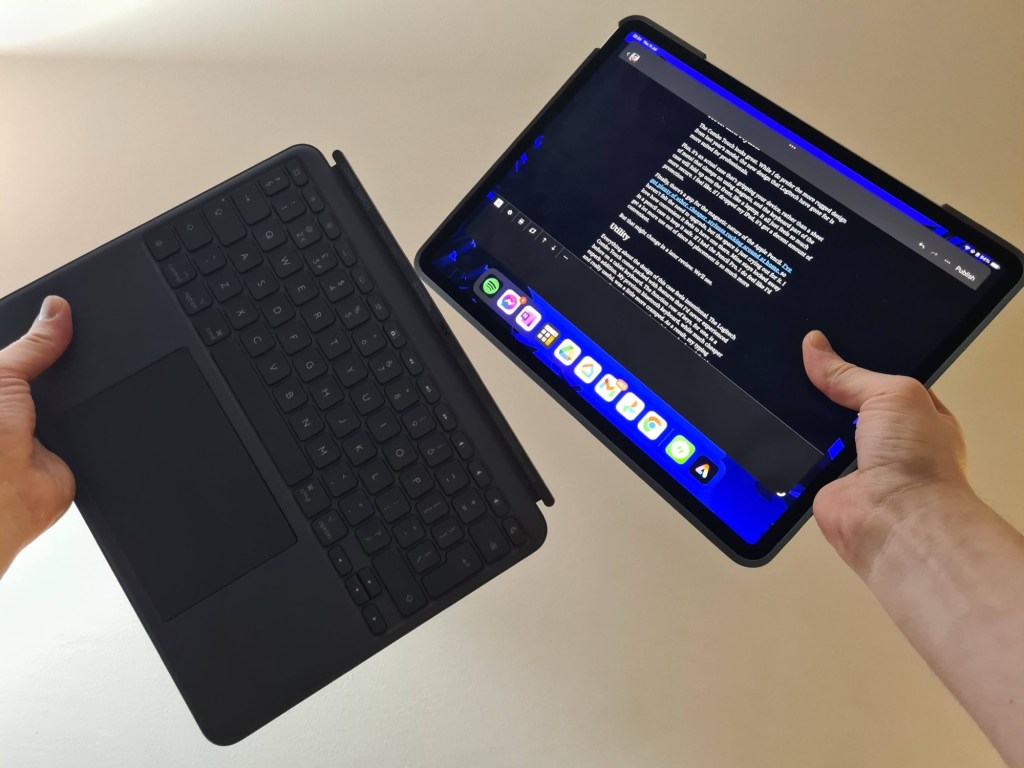
What’s great about the Logitech Combo Touch is that the keyboard is completely detachable.
That’s right: once you’re done with work for the day, just take off the keyboard and click into your favourite streaming app, screen as close to your face as you want with no keys to worry about. While the Magic Keyboard angles itself to hold itself up, the Combo Touch uses a kickstand, not too dissimilar to the ones that come integrated into Windows tablets. It feels incredibly sturdy and offers a few different angles, so that you can type, watch and draw on it in whichever shape is the most ergonomic for your hands.
Sleek and stylish
The Combo Touch looks great. While I do prefer the more rugged design from last year’s model, the new design that Logitech have gone for is more suited for professionals.
Plus, it’s an actual case that’s gripping your device, rather than a sheet of metal that clamps on using magnets, and the keyboard part of the case will fold up onto the front, like a laptop. It all just feels so much more secure. I feel like, if I dropped my iPad, it’s got a decent amount of protection.
Finally, there’s a gap for the magnetic nature of the Apple Pencil. I’ve got plenty of other, cheaper, styluses rocking around at home, so haven’t felt the need to upgrade, but the space is just crying out for it. I love how convenient it feels to have one there. Mine stays locked away in a pencil case to keep it safe. If I had the Pencil Pro, I do feel like I’d get a lot more use out of since its placement is so much more convenient.
But that might change in a later review. We’ll see.
Utility
Everything about the design of this case feels intentional. The Logitech Combo Touch comes packed with features that I’d never experienced before on a tablet keyboard. The function row of keys, for one, is a superb addition. My previous bluetooth keyboard, while much cheaper and really useful, was a little more cramped. As a result, my typing experience wasn’t anywhere near as nice as it is on a keyboard that is so much roomier. That being said, it is far cheaper than either the Combo Touch or Magic Keyboard, so pick one up from this link if you’re in need of a more budget device.*

Speaking of room, check out the size of the trackpad. It is absolutely massive, which makes it so easy to quickly flick onto. The trackpad supports gestures too, which is huge. It means that I barely need to lift my hand up to the screen. Because of this, I now finally understand the true appeal of a touchpad when compared to a Bluetooth mouse. I have an exceptionally comfortable Logitech MX Master 2 for hands that are pretty big. The mouse is a great addition to my desktop setup, and I’d recommend that you pick it up from this link.* but it’s just another thing to carry around when using my iPad, since I prefer working on the go.
I also found that I stopped using the mouse anywhere near as much when it felt more convenient to tap the screen instead of lifting my hand away from the keyboard to the mouse
Likewise, having a row of function keys, letting me adjust the screen brightness, the keyboard backlight, Spotify (including who’s playing and volume), as well as a button for returning to the Home Screen and taking screenshots, is just so convenient.
First world problems? Absolutely. But if we’re optimising for the best possible experience, I don’t think there’s much more that you can do for your productivity than to invest in one of these keyboard cases. If you’re convinced, get yours using my link here.*
Have you invested in the latest iPad? Have you opted for a keyboard case or a more ordinary one? I’d love to see your suggestions in the comments so that we can compare setups.
*Any links marked with an asterisk are affiliate and may generate a small kickback for me at no extra cost to you
If you liked that, you might also like…
- Reclaim your evenings: A Busy Teacher’s Guide to Healthy Meal prep
- 16 incredible books to read in 2026
- How to actually achieve your goals in 2026: The Anti-Resolution toolkit
- The First 90 Days: How to survive (and thrive) as a new Head of History
- 7 Brutal Questions to Course-Correct your Life before 2026
Don’t forget to stay in touch with my socials!
 Hardly Hamilton
4 thoughts on “iPad Air 6 Logitech Combo Touch review – must-have accessory”